Github Actions for Generate AWS Architectures(1)
2024. 9. 8. 23:42ㆍDevOps
name: AWS 아키텍처 추천

# 워크플로우에 필요한 권한 설정
permissions:
  issues: write
  pull-requests: write

# 워크플로우 트리거 설정
on:
  push:
    branches: [ main ]
  pull_request:
    branches: [ main ]
  workflow_dispatch:  # 수동 실행 옵션

jobs:
  analyze_and_recommend:
    runs-on: ubuntu-latest
    steps:
    # 저장소 체크아웃
    - uses: actions/checkout@v2

    # Python 환경 설정
    - name: Python 설정
      uses: actions/setup-python@v2
      with:
        python-version: '3.x'

    # Graphviz 설치 (다이어그램 생성에 필요)
    - name: Graphviz 설치
      run: |
        sudo apt-get update
        sudo apt-get install -y graphviz

    # 필요한 Python 패키지 설치
    - name: 의존성 설치
      run: |
        python -m pip install --upgrade pip
        pip install diagrams openai>=1.0.0

    # OpenAI API를 사용하여 레포지토리 분석
    - name: OpenAI로 레포지토리 분석
      id: repo_analysis
      env:
        OPENAI_API_KEY: ${{ secrets.OPENAI_API_KEY }}
      run: |
        python - <<EOF
        import os
        import json
        import re
        from openai import OpenAI

        client = OpenAI(api_key=os.getenv("OPENAI_API_KEY"))

        # 레포지토리 구조를 문자열로 반환하는 함수
        def get_repo_structure():
            structure = ""
            for root, dirs, files in os.walk("."):
                level = root.replace(".", "").count(os.sep)
                indent = " " * 4 * (level)
                structure += f"{indent}{os.path.basename(root)}/\n"
                subindent = " " * 4 * (level + 1)
                for f in files:
                    structure += f"{subindent}{f}\n"
            return structure

        repo_structure = get_repo_structure()

        # OpenAI API에 보낼 프롬프트 생성
        prompt = f"""
        Based on the following repository structure, analyze the project and provide the following information:
        1. Project type (web, mobile, backend)
        2. Project scale (small, medium, large)
        3. Technologies used (comma-separated list)
        4. Estimated monthly budget in USD (provide a number, e.g. 1000)
        5. Performance requirements (comma-separated list)

        Repository structure:
        {repo_structure}

        Provide the answer in JSON format.
        """

        try:
            # OpenAI API 호출
            response = client.chat.completions.create(
              model="gpt-3.5-turbo",
              messages=[
                    {"role": "system", "content": "You are a helpful assistant that analyzes software projects."},
                    {"role": "user", "content": prompt}
                ]
            )

            content = response.choices[0].message.content.strip()
            if not content:
                raise ValueError("API로부터 빈 응답을 받았습니다")

            # 디버그: API 응답 출력
            print("OpenAI API 응답:")
            print(content)

            # JSON 부분만 추출
            json_match = re.search(r'\{.*\}', content, re.DOTALL)
            if json_match:
                json_content = json_match.group()
            else:
                raise ValueError("JSON 형식의 응답을 찾을 수 없습니다")

            # JSON 파싱
            analysis = json.loads(json_content)

            # 디버그: 파싱된 분석 결과 출력
            print("파싱된 분석 결과:")
            print(json.dumps(analysis, indent=2))

            # GitHub Actions 출력 설정
            with open(os.environ['GITHUB_OUTPUT'], 'a') as fh:
                for key, value in analysis.items():
                    if isinstance(value, list):
                        value = ','.join(map(str, value))
                    elif not isinstance(value, str):
                        value = str(value)
                    print(f"{key}={value}")
                    fh.write(f"{key}={value}\n")

            # 디버그: GITHUB_OUTPUT 파일 내용 출력
            print("GITHUB_OUTPUT 파일 내용:")
            with open(os.environ['GITHUB_OUTPUT'], 'r') as fh:
                print(fh.read())

        except json.JSONDecodeError as e:
            print(f"JSON 디코드 오류: {e}")
            print(f"받은 내용: {content}")
        except Exception as e:
            print(f"오류 발생: {e}")
        EOF

    # 출력 변수 확인
    - name: 출력 변수 확인
      run: |
        echo "Project Type: ${{ steps.repo_analysis.outputs.project_type }}"
        echo "Scale: ${{ steps.repo_analysis.outputs.project_scale }}"
        echo "Technologies: ${{ steps.repo_analysis.outputs.technologies_used }}"
        echo "Budget: ${{ steps.repo_analysis.outputs.estimated_monthly_budget_usd }}"
        echo "Performance Requirements: ${{ steps.repo_analysis.outputs.performance_requirements }}"

    # AWS 아키텍처 다이어그램 생성
    - name: AWS 아키텍처 추천 다이어그램 생성
      run: |
        echo "Generating AWS architecture diagram with the following parameters:"
        echo "Project Type: ${{ steps.repo_analysis.outputs.project_type || 'web' }}"
        echo "Scale: ${{ steps.repo_analysis.outputs.project_scale || 'small' }}"
        echo "Technologies: ${{ steps.repo_analysis.outputs.technologies_used || 'python' }}"
        echo "Budget: ${{ steps.repo_analysis.outputs.estimated_monthly_budget_usd || '1000' }}"
        echo "Performance Requirements: ${{ steps.repo_analysis.outputs.performance_requirements || 'low_latency' }}"

        python generate_aws_architectures.py \
          --project-type "${{ steps.repo_analysis.outputs.project_type || 'web' }}" \
          --scale "${{ steps.repo_analysis.outputs.project_scale || 'small' }}" \
          --technologies "${{ steps.repo_analysis.outputs.technologies_used || 'python' }}" \
          --budget "${{ steps.repo_analysis.outputs.estimated_monthly_budget_usd || '1000' }}" \
          --performance-requirements "${{ steps.repo_analysis.outputs.performance_requirements || 'low_latency' }}"

    # 생성된 다이어그램 아티팩트로 업로드
    - name: 아키텍처 다이어그램 업로드
      uses: actions/upload-artifact@v2
      if: ${{ success() && hashFiles('aws_architecture_*.png') != '' }}
      with:
        name: aws-architecture-diagrams
        path: aws_architecture_*.png

    # 디버그 정보 출력
    - name: 디버그 정보
      run: |
        echo "저장소: ${{ github.repository }}"
        echo "이벤트 이름: ${{ github.event_name }}"
        echo "PR 번호: ${{ github.event.pull_request.number }}"
        echo "워크플로우 실행 ID: ${{ github.run_id }}"

    # 추가 디버그 정보 출력 (실패 시)
    - name: 추가 디버그 정보 출력
      if: failure()
      run: |
        echo "Python 버전:"
        python --version
        echo "OpenAI 라이브러리 버전:"
        pip show openai

    # PR에 코멘트 추가
    - name: PR에 코멘트 추가
      uses: actions/github-script@v6
      if: github.event_name == 'pull_request' && github.event.action != 'closed'
      with:
        github-token: ${{ secrets.GITHUB_TOKEN }}
        script: |
          const { owner, repo } = context.repo;
          const issue_number = context.issue.number;

          console.log('소유자:', owner);
          console.log('저장소:', repo);
          console.log('이슈/PR 번호:', issue_number);

          try {
            const workflowRunId = context.runId;
            const artifactName = 'aws-architecture-diagrams';
            const artifactUploaded = '${{ steps.upload-artifact.outcome }}' === 'success';

            let commentBody = `AWS 아키텍처 추천 프로세스가 완료되었습니다.`;

            if (artifactUploaded) {
              commentBody += `\n\n다이어그램을 확인하려면:
              1. [Actions 탭](https://github.com/${owner}/${repo}/actions/runs/${workflowRunId})으로 이동하세요.
              2. "Artifacts" 섹션으로 스크롤하세요.
              3. "${artifactName}" 아티팩트를 다운로드하세요.
              4. ZIP 파일을 추출하여 다이어그램을 확인하세요.`;
            } else {
              commentBody += `\n\n하지만 다이어그램 생성 또는 업로드 중 문제가 발생했습니다. 자세한 내용은 워크플로우 로그를 확인해 주세요.`;
            }

            commentBody += `\n\n질문이 있거나 추가 설명이 필요하면 알려주세요.`;

            await github.rest.issues.createComment({
              owner: owner,
              repo: repo,
              issue_number: issue_number,
              body: commentBody
            });
            console.log('코멘트가 성공적으로 게시되었습니다');
          } catch (error) {
            console.error('코멘트 게시 중 오류 발생:', error);
            console.error('오류 세부 정보:', JSON.stringify(error, null, 2));
          }
처음 생각한 워크플로우는
- 사용자의 레포지토리 읽기
- 해당 레포지토리에 대한 필요 기술 스택 및 예산 파악 with Open AI
- 해당 반환에 따른 그래프 작성
위 사항이 결과로서의 제안이었으며 추후 다들 AWS 서비스 사용시 참고 자료로 사용하면 좋겠다는 생각에 진행
그러나 알고리즘에 있어서 현실적인 어려움이 있었고 이는 추후 해결할 예정


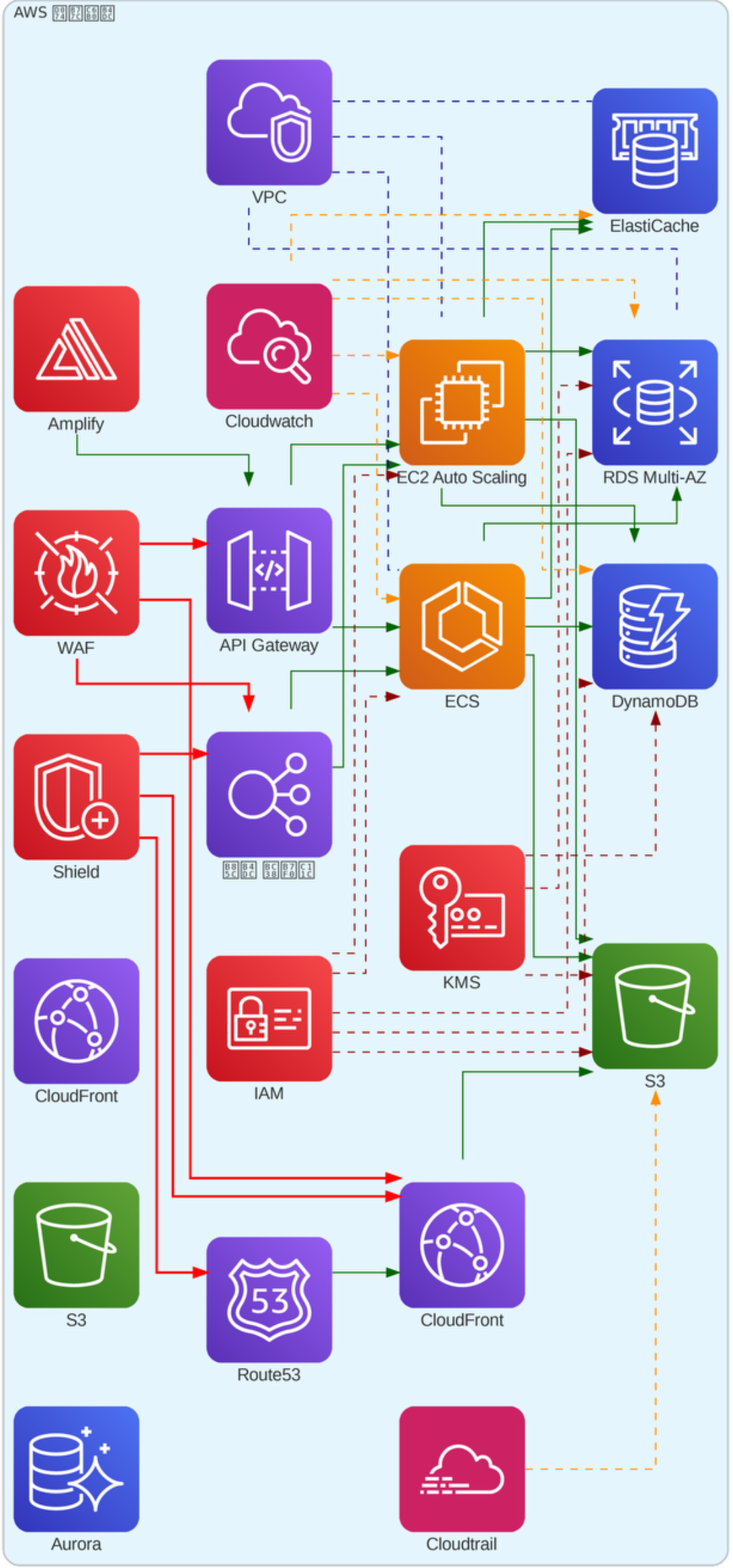
결과적으로 일부 텍스트가 깨지고 비용부분에 대한 추정치 규모가 매우 큼
추후 수정 예정 내용
- 비용을 사용자가 입력
- 출력되는 않는 텍스트 보완
- 최적화된 아키텍처인지 검증
- 아키텍처 설명 작성
'DevOps' 카테고리의 다른 글
| Github Actions for Generate AWS Architectures(2) (0) | 2024.10.28 |
|---|---|
| AWS EC2 Storage 문제 해결 (0) | 2024.08.16 |
| Github Subtree (0) | 2024.07.25 |
| Github Action(Java CI with Gradle) 설정 (0) | 2024.04.23 |